Playing together
There are two ways to surf a heat against a friend: over WiFi, each on your own phone or tablet, or on one screen with two controllers. This page covers both, and how to drive the menus with a controller.
Local multiplayer over WiFi
Phones and tablets on the same WiFi network, surfing the same heat. They talk to each other directly, with no server or internet connection in between.
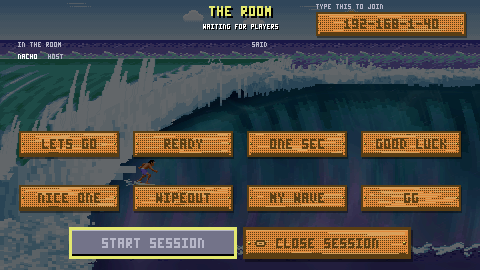
Step by step
- Make sure both devices are on the same WiFi network.
- On the host device: MULTIPLAYER → HOST A SESSION.
- Pick a name the first time you do this (up to six letters). The game remembers it afterwards and skips this step.
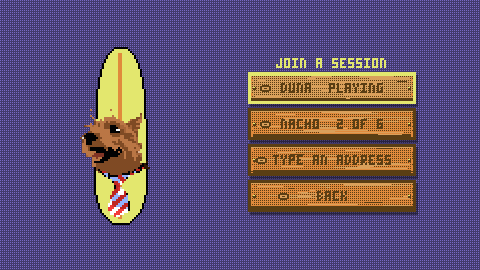
- On the other device: MULTIPLAYER → JOIN A SESSION. The host's room appears in the list, showing their name and how full the room is.
- Tap the room. The host gets a prompt, <NAME> WANTS TO JOIN, and answers LET THEM IN or TURN THEM AWAY. Letting somebody in is a deliberate press.
- The host presses START SESSION. A shared 10-second countdown runs on every device at once, and then you are on the wave.
How the room works
- Up to six people in a room, host included
- Two ride at a time. Everybody else watches the heat live
- Two people in the room play best of three; three to six play a single-elimination bracket, with a bye for anyone with no rival
- A room with two or more people starts itself after 60 seconds if the host does not. A host sitting alone is never sent home by a clock
- START SESSION is refused until there are at least two of you
- Quick chat is eight canned lines: LETS GO, READY, ONE SEC, GOOD LUCK, NICE ONE, WIPEOUT, MY WAVE, GG
- The host leaves with CLOSE SESSION, which ends it for everybody; everyone else has LEAVE SESSION
Why iPhone asks for local network permission. The game finds rooms using Bonjour, Apple's name for the standard way devices announce themselves on a local network. Since iOS 14, any app that does this must ask you first, so you will see a one-time prompt the first time you open the multiplayer screen. Declining it does not break the game. You lose the automatic room list, and the address fallback below still works. Android uses the same underlying protocol and needs no prompt.
When the room does not show up: the address fallback
Automatic discovery is best effort. Guest WiFi with client isolation, two devices on different VLANs, a corporate network that drops multicast, a declined permission prompt: any of these can leave the join list empty. So every room also publishes a plain address you can type in by hand.
On the host's device
Look at the top right of the room screen. Under the words TYPE THIS TO JOIN there is a chip showing an address like:
192-168-1-40
Tap the chip itself to copy it. There is no separate copy button. It flips to say COPIED for a second. Now send it to the other player however you like: a message, out loud, written on your hand.
The address uses dashes where you would expect dots, because the game's pixel font has no full stop. There is no port to type: it is always the same one, so the game fills it in.
On the joining device
MULTIPLAYER → JOIN A SESSION → TYPE AN ADDRESS. That row is always there, underneath the room list, whether or not the list found anything.
Then either tap out the digits on the grid, or press PASTE if you have the address on your clipboard. Press END to connect.
Paste is forgiving. It will happily take 192.168.1.40, 192-168-1-40, an address with a port stuck on the end, or one with stray spaces and newlines around it. It cleans all of that up for you.
If you typed something that is not an address, the game says THAT IS NOT AN ADDRESS and leaves you on the screen to fix it.
Two controllers, one screen
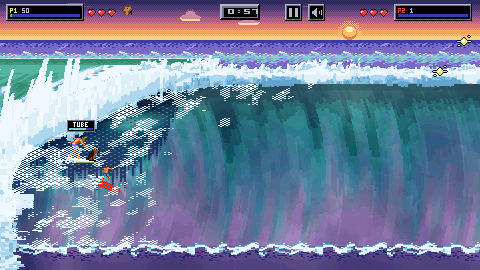
2 PLAYERS mode puts two riders on one device, sharing one wave and one clock.
It needs two game controllers. One of them cannot be the keyboard. Until a second pad is connected, the menu row is greyed out and relabelled NEEDS 2 PADS. It does not disappear, because a row that vanishes teaches you nothing. Connect a second pad and the row lights up on the spot, without leaving the screen.
Getting there
Title screen → START → 2 PLAYERS. It is on the PLAYERS card. MULTIPLAYER, on the title screen, is the WiFi mode.
How it plays
- One shared screen. Both riders are on the same wave, in the same frame
- Riders drop in one at a time: player one's release countdown runs and resolves, then player two's. Only ever one countdown on screen, so you can tell which board is yours
- Press the action button during your countdown to release early
- Each rider has their own lives, their own score, their own Amaru bonus
- Each rider also gets their own landing hint in the top bar, labelled P1 or P2 in that rider's board colour, in a slot of its own, so a hint never moves when the other rider takes off or lands
- A two-rider heat charges nobody a life for missing the target. It is won on points when the clock stops. Player one's score against the target still decides what the card offers next: the next heat, or the same one again
- There is one wave and one break between you. Either of you in the tube pushes it back, and both at once is no faster, so take turns
- Running into each other costs you both 250 points and puts you both back behind the start gate. Nobody loses a life for it
- There is only ever one Amaru. He starts with player one, and if that rider wipes out the other gets him at their next release
- Pause still works, since you are both on the same sofa
Which pad is which
Player one takes the first controller the system lists and player two the next one, and a seat keeps its pad for as long as that pad stays connected. A third pad arriving mid-heat cannot take a board off somebody already riding it: the seats holding pads keep them, and a spare is only ever picked up by a seat with nothing.
A pad that disconnects mid-heat only affects its own seat; it does not shuffle the other rider. It also goes quiet on the very next frame rather than freezing on its last reading, so a dying battery cannot leave a stick deflected or the action button held down. Player one keeps their keyboard and the touchscreen live alongside their pad.
The rest of the game, from steering to the judges, is in How to Play.